Interviewing engineering candidates, evaluating an architecture proposal from your technical team, or deciding on infrastructure investment for the next stage of growth — in every one of these situations, the decision-maker doesn’t need to write code, but does need to understand what the components being discussed actually do. Misunderstanding a foundational concept easily leads to bad decisions: approving an architecture that’s more complex than the business actually needs, or underestimating the risk of a design that looks deceptively simple.
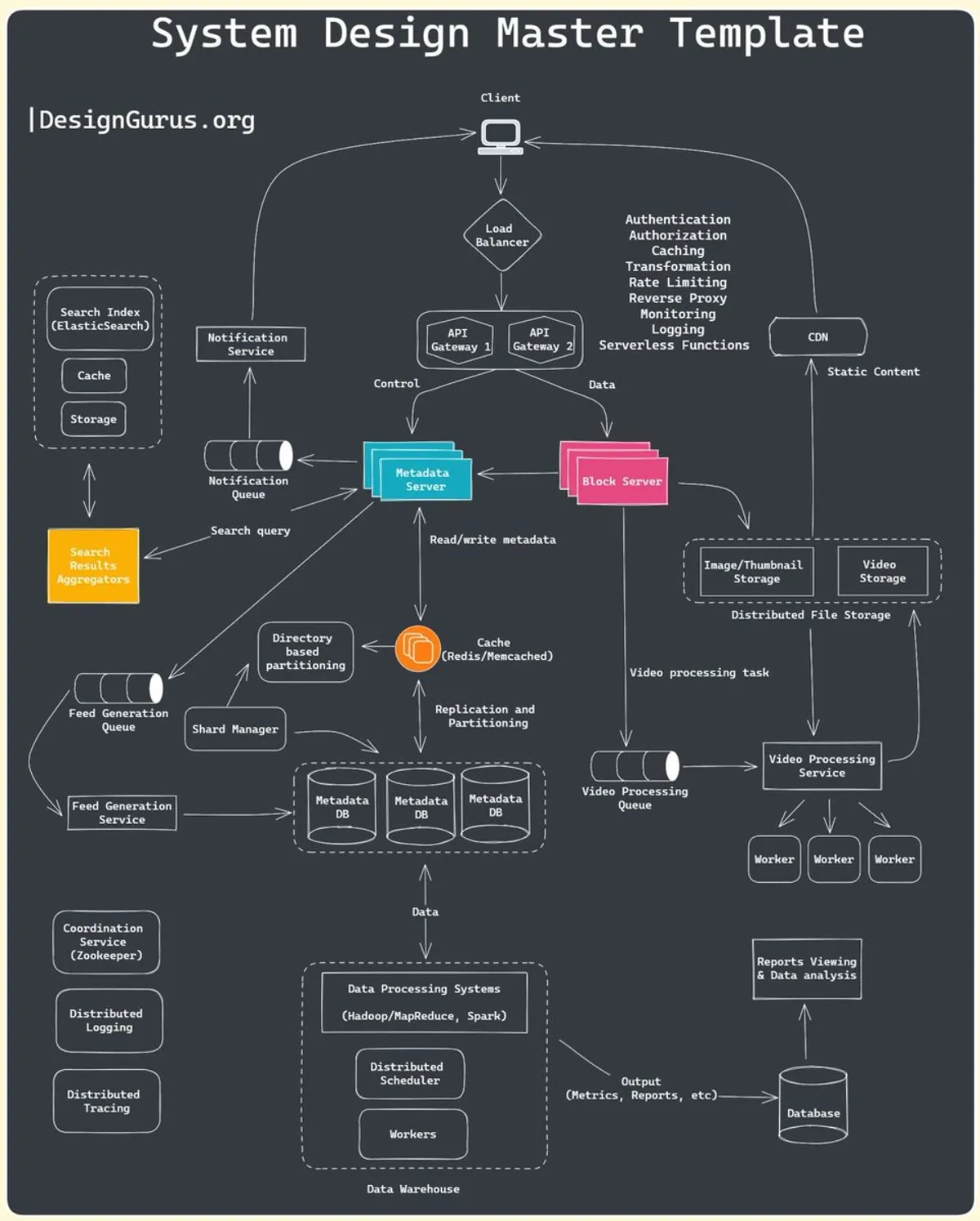
The diagram above illustrates the “System Design Master Template” — an overview map of the components that typically show up in a modern software system: Load Balancer, API Gateway, and CDN on the outer layer; Metadata Server, Cache, Sharding, Message Queue, Search Index, and Data Warehouse on the inner layers. The 16 concepts below walk through each piece of that picture, ordered the way a real request actually flows through a system: from the moment a user types a URL to the moment data is processed and returned.
1. DNS (Domain Name System)
DNS is the internet’s “phone book” — it exists because humans remember names (nexlifysolutions.io) better than numbers (192.0.2.1), but servers can only route traffic using IP addresses.
Resolution happens in several steps, not a single simple lookup:
- The browser sends a query to a recursive resolver (usually provided by an ISP or a service like Google DNS or Cloudflare DNS).
- The resolver asks a root server — this server doesn’t know the IP for
nexlifysolutions.io, but it knows which server manages the .io domain.
- The resolver then asks a TLD server (Top-Level Domain, e.g. the server managing all of
.com), which returns the address of the authoritative name server — the source of truth for that domain.
- The authoritative name server returns the actual IP address for
nexlifysolutions.io.
- The resolver caches the result (based on configured TTL) and returns it to the browser.
Worth flagging when evaluating infrastructure: DNS caching (reduces how often the full resolver chain needs to run, directly affecting first-load time) and DNS load balancing — using DNS to return different IPs for the same domain, distributing load before a request even reaches your actual infrastructure.
2. Load Balancer
A load balancer sits between clients and a pool of backend servers, deciding which request goes to which server. The goal: no single server gets overloaded while others sit idle, and failing servers get pulled out of rotation automatically (health checks).
Three common algorithms, each suited to a different situation:
- Round Robin — distributes requests sequentially across servers (server 1 → 2 → 3 → 1…). Simple and effective when servers have similar capacity and requests carry similar load.
- Least Connections — routes to whichever server currently has the fewest open connections. Better than Round Robin when request processing time varies a lot (e.g. some requests trigger heavy queries, others just hit cache).
- IP Hash — hashes the client’s IP address to consistently route to the same server. This preserves session persistence (sticky sessions) without needing shared session state, but carries a risk: if many clients sit behind the same corporate NAT/proxy, all their traffic lands on one server, creating imbalance.
Load balancers also come in two network-layer flavors: Layer 4 (routes by IP/port, fast but blind to HTTP content) and Layer 7 (understands HTTP headers, paths, cookies — enabling smarter routing, e.g. routing /api/v2 to a new cluster during a migration).
3. API Gateway
Once a system has dozens of microservices, letting clients call each service directly becomes a maintenance nightmare — clients need to know every service’s address, handle auth separately for each, and break every time a service changes its API. An API Gateway solves this by becoming a single entry point.
Its core responsibilities:
- Request Routing — receives client requests and, based on path/headers, decides which backend service to forward them to.
- Authentication & Authorization — verifies tokens/API keys once at the gateway, instead of every service reimplementing auth logic.
- Rate Limiting & Throttling — blocks clients from sending too many requests in a given window, protecting backend services from overload or abuse.
- Caching — caches responses for repeated requests, reducing how often backend services get hit.
- Request/Response Transformation — converts data formats and adds/removes headers, keeping older clients and newer services compatible without changing code on either side.
Worth distinguishing clearly: an API Gateway does not replace a Load Balancer. A load balancer distributes load across instances of the same service; an API Gateway routes between different services and handles logic at the application layer. Confusing these two roles when planning infrastructure often leaves a critical layer missing from the design.
4. CDN (Content Delivery Network)
A CDN solves a physical problem: the speed of light is finite, and the geographic distance between an origin server and a user creates latency that no amount of code can optimize away. The solution is placing copies of content in many locations around the world, closer to users.
How it works:
- A user requests a static asset (image, video, CSS, JS).
- The request routes to the nearest edge server geographically (typically via Anycast DNS).
- If the edge server already has the content cached, it’s returned immediately — low latency.
- If not (cache miss), the edge server fetches it from the origin server or a nearby edge server, caches it, and returns it to the user.
- The CDN periodically checks the origin to refresh its cache (based on
Cache-Control, ETag, or a configured TTL).
In practice, CDNs aren’t just for images and video — many modern systems also cache API responses at the edge (edge caching for GET endpoints that rarely change), or use edge compute (Cloudflare Workers, Lambda@Edge) to run logic right at the edge, cutting round-trips to the origin.
5. Forward Proxy vs Reverse Proxy
These two get confused because they look structurally similar (a server sitting in the middle), but they serve opposite purposes:
- A Forward Proxy sits in front of clients, forwarding requests on their behalf out to the internet. The destination server only sees the proxy’s IP, never the real client. Used for: access control inside a company (blocking sites), client anonymity, or caching content for a group of internal users.
- A Reverse Proxy sits in front of servers, receiving requests from the internet and forwarding them into internal servers behind it. Clients only see the proxy’s IP, never the actual backend structure. Used for: load balancing, response caching, centralized SSL/TLS termination, and most importantly — hiding the real infrastructure, reducing the attack surface. Nginx and HAProxy are the classic examples.
A quick way to remember it: a forward proxy protects and controls the client; a reverse proxy protects and controls the server.
6. Caching
A cache is a high-speed storage layer (usually RAM) sitting between an application and its slower source of truth — disk, network calls, expensive database queries. The general rule: check the cache first (cache hit → return immediately); if it’s not there (cache miss), fetch from the source, store it in the cache, then return it.
In a real system, caching exists at multiple layers simultaneously, not just one place:
- Client-side — browser cache, reducing the number of requests sent at all.
- DNS cache — reduces repeated domain resolution.
- CDN — caches static content at the edge.
- Load Balancer / API Gateway — caches responses for read-heavy, write-light endpoints.
- Application server — caches expensive computed results (in-memory or Redis/Memcached).
- Database — query cache, or caching at the ORM layer.
The critical design question isn’t “should we cache” but cache invalidation — when does cached data go stale, and how do you make sure users never see incorrect data. Three common strategies: TTL (expire after X seconds), write-through (update the cache the moment source data is written), and cache-aside (the application manages reads/writes to the cache itself — the most common approach in practice because it’s simple and flexible).
7. Data Partitioning (Sharding)
When a data table grows too large for a single server to hold or process, there are two ways to split it:
- Horizontal Partitioning (Sharding) — splits the rows of a table across multiple servers/database instances, based on a shard key (e.g.
user_id). Each shard holds a subset of users, and when reading/writing a given user’s data, the system routes precisely to the shard that holds them. This is the primary way to scale write throughput once a single server can no longer hold all the data.
- Vertical Partitioning — splits the columns of a table into separate tables. For example: separating rarely-accessed profile fields (address, bio) from the core user table (id, email, password hash) — making the common query (fetching login info) faster because there’s less data to read.
Choosing the wrong shard key is the most common sharding mistake: if the key causes uneven data distribution (e.g. sharding by account creation date, but one day sees an unusual traffic spike), one shard becomes a hotspot — overloaded while others sit idle. Sharding also makes cross-shard operations (joining data across two users on different shards, or transactions spanning shards) considerably more complex and expensive — which is why sharding is usually a last resort, after read replicas and caching have already been maximized.
8. Database Replication
Replication is the technique of maintaining multiple copies of the same database across different servers — not to split data (like sharding), but to fully duplicate it.
The most common model: a single primary (master) handles all writes, while one or more replicas (slaves) sync data from the primary (via binlog replication or streaming replication, depending on the database engine). The application routes writes to the primary and reads to replicas.
Concrete benefits:
- Improved read performance — since most systems have a read-to-write ratio far higher than 1:1, offloading reads to replicas frees up significant capacity on the primary.
- High availability — if the primary fails, a replica can be promoted to become the new primary (failover), reducing downtime.
- Better data protection — losing one server doesn’t mean losing data, since copies exist elsewhere.
Worth checking when evaluating a system’s SLA and uptime: replication lag — the delay between when the primary writes data and when a replica catches up. If an application reads from a replica right after writing to the primary, users may see stale data (the “I just changed my name, why does it still show the old one?” scenario). This is the question to ask when a technical team proposes adding a replica: “What’s the maximum sync delay, and which business flows can’t tolerate that delay?“
9. Distributed Messaging Systems
When two services need to exchange information without depending on each other directly (if Service B goes down, Service A shouldn’t fail because of it), the solution is to put a message broker between them. Service A pushes a message onto a queue/topic, and Service B reads and processes it whenever it’s ready — the two are fully decoupled, both in timing and in deployment lifecycle.
Two main models:
- Message Queue (e.g. RabbitMQ, Amazon SQS) — each message is processed by exactly one consumer, suited for one-time tasks (sending an email, resizing an image, processing a payment).
- Publish/Subscribe (e.g. Apache Kafka, Google Pub/Sub) — a message is delivered to multiple subscribers at once, suited for when several services need to know about the same event (e.g. “order created” — inventory, notifications, and analytics services all need to know).
Kafka additionally offers durable log storage (messages aren’t discarded after being read, and can be replayed), making it well-suited for both event sourcing and large-scale real-time data processing — which is why Kafka tends to be more common than RabbitMQ in data-intensive systems.
10. Microservices
Microservices is an architecture that splits a large application into many small, independent services, each owning a specific business domain — the opposite of a monolith, where all logic lives in one codebase, deployed as one unit.
Core characteristics:
- Single Responsibility — each service does one clear thing (payments service, user service, notifications service), making it easier to understand and maintain.
- Independence — each team can deploy and scale its own service without waiting on or coordinating with other teams.
- Decentralized data ownership — each service manages its own database, avoiding the situation where multiple services read/write directly into one shared database (a common source of hard-to-debug bugs in large monoliths).
- Communication via API/messages — REST, gRPC (higher performance for internal service-to-service calls), or message queues for asynchronous communication.
- Fault isolation — a failure in one service (e.g. a slow recommendations service) doesn’t necessarily bring down the whole system, if designed with circuit breakers and sensible timeouts.
The trade-off worth weighing before approving a microservices architecture: it solves organizational scaling (multiple teams working independently) and technical scaling (scaling individual parts), but comes with a significant jump in operational complexity — service discovery, distributed tracing, API versioning across services, and handling network failures (which simply don’t exist in a monolith, where everything runs in one process). For small teams or early-stage products, microservices are often a cost paid upfront rather than a benefit realized — a decision that deserves careful thought, not a trend to follow by default.
11. NoSQL Databases
NoSQL exists to solve problems that relational databases (fixed schema, heavy ACID transactions) aren’t optimized for: unstructured data, large volumes, and easy horizontal scaling. Four main categories, each suited to a different kind of problem:
- Document-based (MongoDB, Couchbase) — stores data as JSON/BSON documents, each self-contained with all related information, no joins needed. Good for: product catalogs, user profiles, CMS content — anywhere the data shape is flexible and varies between records.
- Key-Value (Redis, DynamoDB) — the simplest model, key-based lookups with extremely low latency. Good for: session storage, caching, feature flags, leaderboards.
- Column-family (Cassandra, HBase) — optimized for heavy write volume, reads by a known row key. Good for: time-series data, logs, IoT data — anywhere write speed is the top priority.
- Graph-based (Neo4j, Amazon Neptune) — represents data as nodes and edges, optimized for multi-hop relationship queries. Good for: social networks (friends of friends), recommendation engines, fraud detection based on relationship networks.
Worth pushing back on when discussing database choice with a technical team: don’t accept “NoSQL is faster than SQL” as a blanket justification — ask them to be specific about what’s being traded away. NoSQL gives up strong consistency and complex join capability in exchange for horizontal scalability and flexible schema. The right choice depends on actual data shape and query patterns, not technology trends.
12. Database Index
Without an index, a query like WHERE email = 'x@y.com' forces the database to scan every row in a table (full table scan) — fine with 1,000 rows, a disaster with 100 million. An index is an auxiliary data structure, like a book’s table of contents, that lets the database engine jump straight to the data it needs.
The most common type is the B-tree index — organizing data in a hierarchical tree, well-suited for exact lookups, range queries (WHERE age BETWEEN 20 AND 30), and sorting. There’s also hash indexes (fast for exact lookups but no range query support) and bitmap indexes (efficient for columns with few distinct values, like order status).
The trade-off that always needs mentioning:
- Extra storage — each index is its own data structure, existing alongside the original table.
- Slower writes — every insert/update/delete has to update every related index too, so tables with too many indexes end up with lower write throughput.
The practical rule: only index columns that regularly appear in WHERE, JOIN, or ORDER BY clauses — indexing everything “just to be safe” is one of the most common reasons a system’s write performance degrades over time.
13. Distributed File Systems
When the volume of files (images, videos, logs, backups) grows too large for a single server to hold, or needs to be accessed from multiple places at once, a distributed file system lets you store files across many servers while still accessing them as one unified file system — the application never needs to know which node a file actually lives on.
The typical architecture has two kinds of nodes: a metadata server (tracks where a file lives, who owns it, access permissions — corresponding to the “Metadata Server” in the template diagram) and block/data servers (store the actual file content, usually split into blocks and replicated across nodes to guard against data loss). Classic examples: HDFS (Hadoop Distributed File System), Google File System (GFS) — the foundation of today’s entire big-data processing ecosystem.
14. Notification System
A notification system is responsible for sending notifications to users — email, push notifications, SMS — often at large scale (millions of users at once in some cases, like promotional announcements).
A properly designed one almost always goes through a message queue: a business service (e.g. an orders service) doesn’t send emails directly; it pushes a message onto a queue (“order #123 confirmed”), and a separate notification service reads the queue and handles the sending logic (choosing the channel, template, retrying on failure). This approach:
- Lets the business service respond quickly, without being blocked by calling a (typically slow and unreliable) third-party email/SMS API.
- Makes retries on failure easy, without affecting the main business flow.
- Makes it easy to add new channels (e.g. push notifications) without touching the business service.
15. Full-text Search
Searching with LIKE '%keyword%' in SQL doesn’t scale — it’s slow and has no understanding of meaning (it can’t tell that “run” and “running” are related). Full-text search solves this with an inverted index — a data structure that maps keywords to the list of documents containing them, along with position and relevance information.
Example: indexing “Nexlify builds scalable systems” and “Nexlify technical consulting” produces an inverted index like: Nexlify → [doc1, doc2], builds → [doc1], consulting → [doc2]. When a user searches “Nexlify”, the system immediately retrieves [doc1, doc2] without scanning any content. Elasticsearch (built on Apache Lucene) is the most widely used tool for this, usually deployed alongside the primary database (not replacing it — data is synced over to serve search specifically).
16. Distributed Coordination Services
In a system with dozens or hundreds of nodes running in parallel, there are problems no single node can solve on its own: who is the leader in a cluster of services? Which config version is current, and which one should every node sync to? Which nodes are alive, which have died? This is the role of a distributed coordination service.
Core functions:
- Leader election — when exactly one node needs to act as coordinator (e.g. in Kafka, one broker is elected controller), the coordination service ensures every node agrees on who the leader is, and automatically elects a new one if the current leader dies.
- Distributed locking — ensures only one node performs a given action at a time (preventing two nodes from processing the same task simultaneously).
- Configuration management — stores centralized config that every node reads from, keeping things consistent when config changes.
- Service discovery / health checks — tracks which nodes are currently alive, so load balancers or other services know where to route requests.
Classic examples: Apache ZooKeeper (used by Kafka, HBase), etcd (used by Kubernetes to store all cluster state), Consul (service discovery and config management in microservice architectures).
Conclusion
These 16 concepts form the basic vocabulary needed to understand almost any modern system architecture — from an e-commerce platform, to a fintech app, to internal enterprise systems. But knowing the names and definitions is only the starting point; the real value comes from being able to ask the right questions when evaluating a technical proposal — knowing when to reach for sharding instead of just adding a read replica, when a message queue beats a direct synchronous API call, when a system genuinely needs strong consistency and when eventual consistency is good enough.
As a CTO or business owner, the most effective way to use this isn’t to design systems yourself — it’s to use these concepts to ask your technical team the right questions: “Why this architecture instead of something simpler?”, “If traffic grew 10x tomorrow, what breaks first?”, “What are we trading away to get that scalability?” Being able to answer those questions — or knowing how to demand answers from your team — is the moment technical knowledge turns into sound technology investment decisions.
Adapted and expanded from “16 System Design Concepts I Wish I Knew Before the Interview” by Arslan Ahmad on Level Up Coding. If you’re a CTO or business owner who needs to evaluate your architecture or plan for scale, get in touch with Nexlify.